Traverse Standard v11.0
Post Billings
Use the Post Billings function to allow users to post billings to General Ledger and Accounts Receivable History. When you post billings, open invoices are created for each billing and miscellaneous credit entry recorded as a billing. The due date for each billing is updated from the invoice date and the number of due days for the terms code. The discount date is updated from the invoice date and the number of discount days from the same terms code.
 Post Billings Overview
When you post billings, the system creates temporary tables to store project activity entries and totals. As information is posted, Project activity information is posted first, then totals are updated. When all project activities are posted summary GL entries are calculated.
If Project Costing interfaces with General Ledger, debit and credit entries are created in the GL Journal. If detail information is posted, entries are made for each project activity. If summary information is posted, one entry is made for each account. If the accounting period is closed, you can either edit billings or use the System Manager Period Conversion function to open the accounting period and then post the billings.
Posting billings also updates balance and sales fields in the customers’ records. The taxable and nontaxable totals from the billings and the tax collected update the tax location records in System Manager.
When you post invoices for billable time and material projects (non-fixed fee), entries are made to these accounts:

The General Ledger account in the tax location record determines the tax liability account. The distribution codes record from AR determines the receivable account. The accrued income, income, and WIP accounts come from the Project Costing distribution code assigned to the project/task.
When you post invoices for billable fixed fee projects, entries are made to these accounts:

The General Ledger account in the tax location record determines the tax liability account. The distribution codes record from AR determines the receivable account. The income account comes from the Project Costing distribution code assigned to the project/task.
When you post invoices for job cost projects, entries are made to these accounts:

The General Ledger account in the tax location record determines the tax liability account. The distribution codes record from AR determines the receivable account. The fixed fee billing account comes from the Project Costing distribution code assigned to the project/task.
When you post invoices the following accounts will be posted to for the deposit amounts applied to invoices:
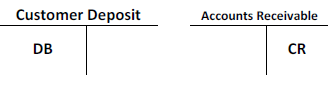
The customer deposit account will come from the customer deposit account selected in the Project Costing Business Rules. The Accounts Receivable account will come from the Accounts Receivable distribution code entered for the invoice. The default will be the distribution code assigned to the customer, but can be changed for the invoice.
When credit memos are posted for each type of project, the GL entries will be on the opposite sides from the illustrations above.
To post billings:
- Complete Billings.
- Print Invoices.
- Print Billing Journals.
- Select the Do the following, then check the box check box.
- Select the Print Log Using Base Currency check box, if applicable, to print the log using the selected base currency.
- Select the batches to post.
Note: This option only appears if you elected to use batch processing in the Business Rules function. You can use the All button to select all batches to post or you can use the None button to deselect all batches from posting. - Enter comments for the post, if applicable, in the Comments field.
- Click a command button to
| Click | To |
| OK | Begin posting the transactions. |
| Activity | Display the Activity Log to view posting activity. |
| Reset | Set all fields to their default values. |